
The software is available in two versions; one for 32-bit operating systems, and one for 64-bit operating systems. The installers are located in Zip files which can be found on the Downloads page on the Optec website. The zip files are named OptecTCF-S_Installer_x86(x.x.x).zip and OptecTCF-S_Installer_x64(x.x.x).zip for 32 and 64 bit operating systems, respectively.
After downloading the correct zip file save it to a location on your hard drive and extract the files. The zip folder will contain two files; double click the file named Setup.exe to begin the install. Follow the setup wizard until you get to the page titled Select Install Components. The installer gives the user the choice of installing the TCF-S Focuser Control Program and/or the TCF-S ASCOM Driver. Check the check-boxes for the components you wish to install and click next.
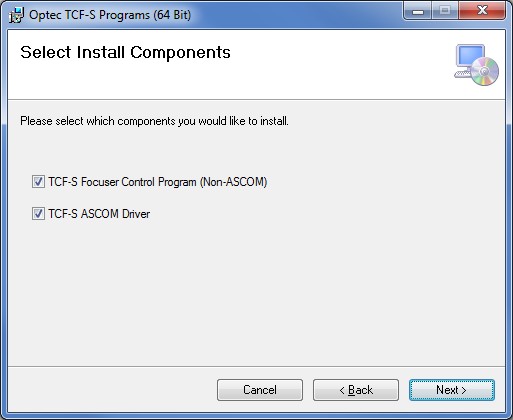
The default location for the program files including the data files is in the Program Files folder under Optec/TCF-S. The user can not specify any other location for the files during the installation.
If the TCF-S Focuser Control program was selected for install a shortcut will be automatically placed in the following location.
Start/All Programs/Optec/TCF-S/
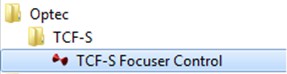
Right-click the shortcut and select Delete to remove it from your Start menu.
If the TCF-S Focuser Control program was selected for install a shortcut will automatically be placed on the user's Desktop. Double-click this shortcut to start the program.

All of the necessary program files for the TCF-S Focuser Control program and the TCF-S ASCOM driver are located in the Program Files Folder/Optec/TCF-S. Removing any of the files in this folder or any of its sub-folders could cause the application to cease to function properly.
Copyright � 2010 - Optec, Inc. - 199 Smith Street - Lowell, MI 49331 - U.S.A.